Warning
This is an internal project, and is not intended for public use. No support or stability guarantees are provided.
Releases
Context
Problems
- Users who haven't upgraded to the latest version still need an accurate reference
- Creating permalinks for linking from code (the link in
jsdoc). Clicking a link while using a given version of the library should open the version that they are using. - Creating permalinks for archival purposes, e.g. Another publication writes, “Library X Adds New Feature in v1.5” linking to
https://v1-5.lib.example/component/y. Then the link will always be relevant to the version published, and a suggestion to move to the latest version of the page should be visible when visiting. - Easy “copy quote with reference” button
- Netlify PR preview retention we reduced to 90 days. It's a pain to do a bisection to find where the regression started on the docs. https://github.com/mui/mui-public/issues/1016.
Release Styles
When it comes to releases, projects generally fall into one of two categories: stable or iterative. One is not better than the other, and often times the best setup is iterative libraries which depend on stable libraries. A stable library will likely publish minor versions: https://v1-5.lib.example/. An iterative library will likely publish only major versions: https://v2.lib.example/ .
Stable Library
A stable library strives to keep a stable API at the expense of slower and additive development. This library has achieved v1.0 after changes have slowed within a mature v0.x release channel. A stable library expects users to conform to its API, since a low-level API might not be flexible in its structure. Major releases are avoided at all costs, but popular libraries will inevitably need them.
Examples of stable libraries:
React
- v0: went from
v0.14tov15 - v15: 2016
- v16: 2017
- v17: 2020
- v18: 2022
(only 4 major versions across ten years)
Their policy:
Breaking changes are inconvenient for everyone, so we try to minimize the number of major releases – for example, React 15 was released in April 2016 and React 16 was released in September 2017, and React 17 was released in October 2020.
Kubernetes
- v1.35 - Dec 2025
- v1.34 - Aug 2025
- v1.33 - May 2025
- v1.32 - Dec 2024
- v1.31 (EOL) - Aug 2024
- v1.30 (EOL) - Jun 2024
(only 1 major version across 11 years)
Typescript
- v1: 2014
- v2: 2016
- v3: 2018
- v4: 2020
- v5: 2023
(only 5 major versions across a dozen years)
Iterative Library
An iterative library strives to iterate quickly on its API, while maintaining a major version for a fixed duration (1 year, etc). This can balance development speed while still avoiding making breaking changes too often. This library has achieved v1.0 after multiple alpha and beta release cycles. An iterative library expects changes in it's use-cases as adoption increases. An iterative library aims to conform to user expectations. Major versions can be used symbolically to emphasize large additions.
An option becoming more popular that makes it clear a library is iterative is using the year as the major version: v26.04.0 was released in March 2026. Or just v26.1.0 was released in 2026.
Examples of iterative libraries:
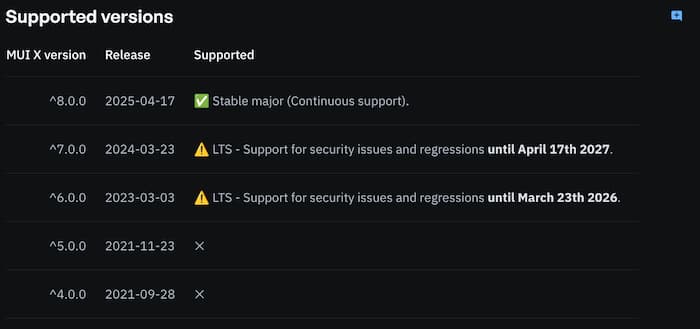
MUI X
Aims for stable release once a year:
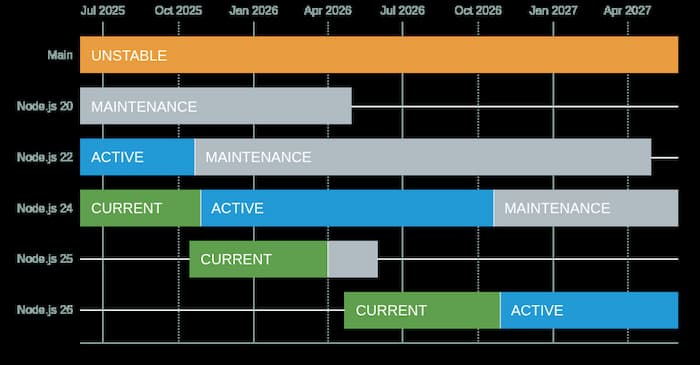
Node.js
Next.js
- 16 - 2025
- 15 - 2024
- 14 - 2023
- 13 - 2022
- 12 - 2021
- 11 - 2021
- 10 - 2020
- 9 - 2019
- 8 - 2019
- 7 - 2018
- 6 - 2018
- 5 - 2018
Next.js has 1-2 releases a year. New major version are usually used to change default values.
Spec
A library with a relatively stable API, might not release major versions very often, so minor versions could be expressed with a dash. Patch versions should never be expressed in a subdomain. For the most common case, libraries or frameworks will release major versions often enough where the minor version becomes irrelevant.
For convenience, https://v1.lib.example/ should be aliased to the most recent v1 release, e.g. v1.5.2. https://lib.example/ would be aliased to the latest release. https://beta.lib.example/ would be aliased to the latest beta, same for alpha and canary. Release Candidates should not be accessed this way, they should be linked to the full subdomain.
v0.1 should not be archived. When you intend to archive, you should move to alpha and beta versions of v1.0
The SemVer spec defines:
4. Major version zero (0.y.z) is for initial development. Anything MAY change at any time. The public API SHOULD NOT be considered stable. 5. Version 1.0.0 defines the public API. The way in which the version number is incremented after this release is dependent on this public API and how it changes.
v1.0-beta.5 should be expressed as https://v1-beta.lib.example/ .
When archiving is intended for each iteration, move to an RC release. v1.0-rc.5 becomes https://v1-rc-5.lib.example/
The simplest way to deploy this would be to create a branch for each version you intend to maintain, e.g. v1, v2, v3 or v1-0, v1-1, v1-2 . If a v1-5 style branch is not desired, the https://v1-5.lib.example/ subdomain should be aliased to the deployment for the v1.5.0 tag on git and each v1.5.* release should update that alias. Netlify might not have this capability, but it does allow unlimited branch deploys, which won't ever be deleted.
Each version should be listed somewhere accessible to crawlers.
Within the code, the link to the documentation should include the version string and @see link.
/**
 * Call this function and it will do something.
 *
 * @version v1.5.2
 * @since v1.3.0
 * @see {@link https://v1-5.lib.example/functions/do-something|Docs}
 */
export function doSomething() {}
@since should be added when missing and never updated. Never add a since for a release that hasn't had a v1.0
The documentation should be auto-generated using eslint --fix .
After releasing a new version, the package.json version should be bumped to the next minor version.
The <link rel="canonical" href="" /> tag should not be included on the page so that the same deployment that was used for lib.example can be moved to v1.2.lib.example after it is archived without needing to rebuild it.
Opengraph images should use the full versioned URL: https://v1-5.lib.example/functions/do-something.png
If a version does not yet exist, we should try and resolve its location instead of showing a 404. Say the user arrives at https://v1-5.lib.example/functions/do-something, but 1.5 doesn't exist yet:
- Does
https://v1-5-rc-1.lib.example/functions/do-somethingexist?- If it does, we have to find the latest release caidate, e.g.
https://v1-5-rc-3.lib.example/functions/do-something. There shouldn't be too many release candidates, so tryingrc.0,rc.1,rc.2,rc.3,rc.4,rc.5in parallel should allow us to find the last one that exists.rc.5exists, fetchrc6 through 11
- If it does, we have to find the latest release caidate, e.g.
- Does
https://v1-5-beta.lib.example/functions/do-somethingexist? - Does
https://v1-5-alpha.lib.example/functions/do-somethingexist? - Does
https://v1-5-canary.lib.example/functions/do-somethingexist?
After resolving the URL, it should redirect the user to the resolved URL with ?ref=v1-5 appended, e.g. https://v1-5-canary.lib.example/functions/do-something?ref=v1-5 which should be removed by the client.
If the version is the latest, it should have a redirect to the branch deploy: https://v1-5.lib.example/functions/do-something → https://lib.example/functions/do-something
This can be achieved by committing a redirect in that branch that has the latest version.
// next.config.js
const version = resolve('./package.json').version;
const [publishedVersion, branch = ''] = version.match(/(v?\d+\.\d+)\.\d+(?:(-\w+\.)\d+)?/);
const domainVersion = publishedVersion.replace('.', '-');

module.exports = {
  async redirects() {
    return [
      {
        source: '/:path*',
        has: [
          {
            type: 'host',
            value: `${domainVersion}${branch}lib.example`,
          },
        ],
        destination: `https:///${branch}lib.example/:path*`,
        permanent: false,
      },
    ];
  },
};
The version resolution logic works if you consider each release type should be one minor version ahead:
v1-3→v1.3.5v1-4→v1.4.4latest→v1.5.3beta→v1.6.2-beta.1alpha→v1.7.1-alpha.1canary→v1.8.0-canary.1
Where each release cycle moves the version one stage ahead.
Where alpha and beta are not used, a simple one version difference achieves the same effect:
v1→v1.9.3v2→v2.7.2latest→v3.5.1canary→v3.6.0-canary.1
Patch releases don't flow through the typical release stages. They're applied directly to the maintenance branch for that version. Maintenance branches can be v1 or v1-5 depending on if patching previous minors are desired. The version in a maintenance branch when it is created should always have its patch version incremented. For example, when v1.5.0 is released, a v1-5 branch should be created where the version is v1.5.1 , and master is bumped to v1.6.0. This signifies where you should commit changes. If they are intended to be a patch they should be based on the v1-5 branch (v1.5.1). If they is new behavior, they should be based on the master branch (v1.6.0). A patch should be applied at the oldest maintenance branch that is relevant, then applied to newer branches, then release branches (latest, beta, alpha, canary).
If a patch is urgent, then you want to get it to the most risk adverse users first. If you consider what release a user is consuming:
| Versions with Active Development | Current | Tag | How Critical is a Bug? |
|---|---|---|---|
| v1.3 | v1.3.5 | lts | High |
| v1.4 | v1.4.4 | v1-4 | Medium |
| v1.5 | v1.5.3 | latest | Medium |
| v1.6 | v1.6.2-beta.1 | beta | Low |
| v1.7 | v1.7.1-alpha.1 | alpha | Low |
| v1.8 | v1.8.0-canary.1 | canary | Low |
The same applies when only targeting major versions:
| Versions with Active Development | Current | Tag | How Critical is a Bug? |
|---|---|---|---|
| v1 | v1.9.3 | lts | High |
| v2 | v2.7.2 | v2 | Medium |
| v3 | v3.5.1 | latest | Medium |
| v3.6 | v3.6.0-canary.1 | canary | Low |
To resolve a full list of versions, the canary release should be aware of all the existing versions in alpha, beta, and itself. We can resolve it at https://canary.lib.example/releases. This allows us to know the latest patch version for alpha and beta branches. And because the maintenance branch is merged into the newer branch, patches in the releases get brought upwards.
This also benefits us because the existence of patches isn't published until they exist on all maintenance branches. But if a bug is being fixed for a critical customer, you can notify them early or automated updates will detect the new version and create the PR. This comes into effect if a patch for an early version is difficult to bring into a newer version For example, if you are patching a bug v1.4 is easy, but complicated in v1.5 because the code has been refactored. In this case, we shouldn't block the fix for v1.4 on the fix for v1.5.
When releasing a new version (minor or major), all [New] tags should be removed from the page indexes.
Quoting the Docs Externally
Text from a specific part in the page can be quoted and referenced. Copying this into the clipboard should be available along with the button which puts the link into the address bar.
<div>
  <p>
    <cite><a href="https://semver.org/spec/v2.0.0.html#spec-item-5"> SemVer v2.0 Item 5 </a></cite>:
  </p>
  <blockquote cite="https://semver.org/spec/v2.0.0.html#spec-item-5">
    <p>
      <a href="https://semver.org/spec/v2.0.0.html#spec-item-5">5.</a>
      Version 1.0.0 defines the public API. The way in which the version number is incremented after
      this release is dependent on this public API and how it changes.
    </p>
  </blockquote>
</div>
or the citation could be copied inline:
<cite><a href="https://semver.org/spec/v2.0.0.html#spec-item-5">SemVer v2.0 Item 5</a></cite>
Why should references to the docs include the version in it? It acts as a permalink which mirrors this convention when discussing code on GitHub: https://huonw.github.io/blog/2024/07/github-permalinks/